
Email is a vital business communication channel, connecting organizations with customers, employees, partners, and vendors. But as email-based cyberattacks grow more sophisticated, proper authentication matters. Authentication failures can send legitimate messages to spam, lead receiving servers to reject them, or trigger security warnings—disrupting communication, harming sender reputation, and weakening customer trust.
Before launching another email campaign or relying on your domain for important business messages, check your DMARC setup. Domain-based Message Authentication, Reporting, and Conformance (DMARC) lets domain owners monitor and control how receiving mail servers handle messages that fail authentication. Regular checks can help you find DNS errors, identify unauthorized senders, and improve email deliverability.
What Is a DMARC Check and Why Does It Matter?
A DMARC check examines a domain’s DMARC DNS record to confirm that it is published and configured correctly. It reviews policy settings and syntax, helping identify potential authentication issues that could affect outgoing email.
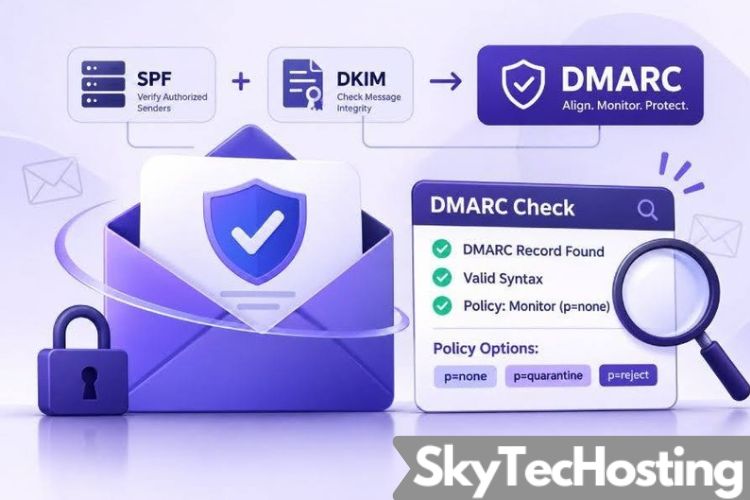
DMARC works with two email authentication protocols: Sender Policy Framework (SPF) and DomainKeys Identified Mail (DKIM). SPF checks whether a sending server is authorized to send email for a domain. DKIM uses a cryptographic signature to help verify that a message is associated with the signing domain and has not been modified in transit.
DMARC builds on SPF and DKIM by checking whether either protocol’s authentication aligns with the domain shown in the email’s From address.
Prevent Legitimate Emails From Failing Authentication
Incorrect DNS records, missing DKIM signatures, unauthorized sending services, or alignment issues can cause legitimate emails to fail DMARC authentication. A DMARC check can help identify these configuration problems before they affect large-scale email communications.
For example, a business may use Microsoft 365 for employee email and a separate platform for marketing campaigns. If both services aren’t correctly configured in the domain’s SPF and DKIM settings, some messages may fail authentication.
Protect Your Domain From Email Spoofing
Email spoofing happens when attackers forge a sender address to make a fraudulent message appear to come from a trusted domain. DMARC helps receiving servers decide what to do with messages that fail authentication.
With an appropriate DMARC policy, organizations can tell those servers to monitor, quarantine, or reject messages that fail DMARC evaluation—reducing opportunities for attackers to misuse their business identities.
Common DMARC Issues That Can Cause Authentication Failures
Even organizations with established email security practices can encounter authentication issues. Regular DMARC checks help identify errors that might otherwise go unnoticed.
Incorrect or Missing DMARC DNS Records
Publish your DMARC record as a TXT record under the _dmarc subdomain. A basic monitoring policy might look like this:
v=DMARC1; p=none; rua=mailto:[email protected]
If the record is missing, formatted incorrectly, or published under the wrong hostname, receiving servers may not process your domain’s DMARC policy correctly. Use a DMARC checker to verify that the record exists and its tags are formatted properly.
SPF and DKIM Alignment Problems
Passing SPF or DKIM alone does not guarantee a DMARC pass. At least one must align with the domain in the visible From address.
For example, an email can pass SPF using a third-party sending domain and still fail DMARC if that domain does not align with the From domain.
A valid DKIM signature can also fail to satisfy DMARC if its signing domain does not meet the configured alignment requirements.
Unauthorized Email-Sending Services
Businesses often use multiple platforms to send transactional emails, newsletters, password resets, and customer notifications. If a new service isn’t properly authenticated, its messages may fail DMARC checks.
Reviewing DMARC reports can reveal unfamiliar sending sources and help determine whether they’re legitimate business services or potentially unauthorized senders.
How to Run a DMARC Check Before Sending Emails
Make DMARC checks a regular part of your email security routine. A few verification steps can help prevent avoidable authentication failures.
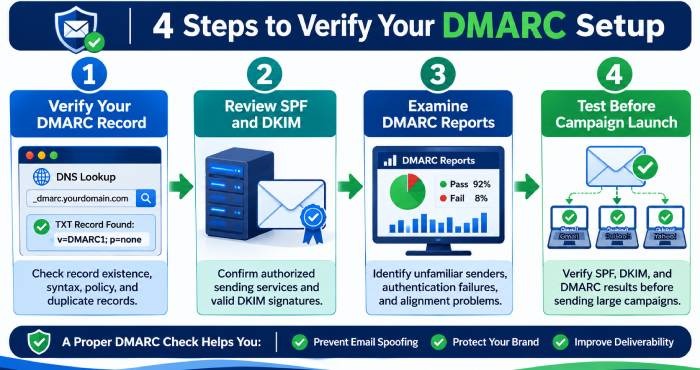
Step 1: Verify Your DMARC Record
Use a reliable DMARC tools online to look up your domain’s published DNS record. Verify that the record exists, starts with `v=DMARC1`, and contains a valid policy tag.
Check for duplicate records, syntax errors, and incorrect tag values—there should be only one DMARC record at the relevant DNS location.
Step 2: Review Your SPF and DKIM Configuration
Review your SPF record to ensure it includes every authorized sending service. SPF permits no more than 10 DNS-query-causing terms during evaluation; exceeding that limit can trigger a PermError and cause authentication failures.
Also confirm that DKIM signing is enabled for every legitimate email platform, that each corresponding public key is correctly published in DNS, and that messages are signed with the expected domain.
Step 3: Examine DMARC Reports
DMARC aggregate reports show which sources are sending email from your domains, how those messages authenticate, and where alignment fails. Review them for unexpected IP addresses, unfamiliar sending services, SPF or DKIM failures, and alignment issues.
Before changing your enforcement policy, investigate any legitimate services that aren’t authenticating successfully.
Step 4: Test Your Configuration Before Campaign Launches
Before launching a large email campaign, send test messages to multiple receiving providers and review their headers for SPF, DKIM, and DMARC results.
This can help uncover issues with newly configured platforms, DNS changes, or email routing before they affect a broader audience.
Choosing the Right DMARC Policy to Reduce Email Risks
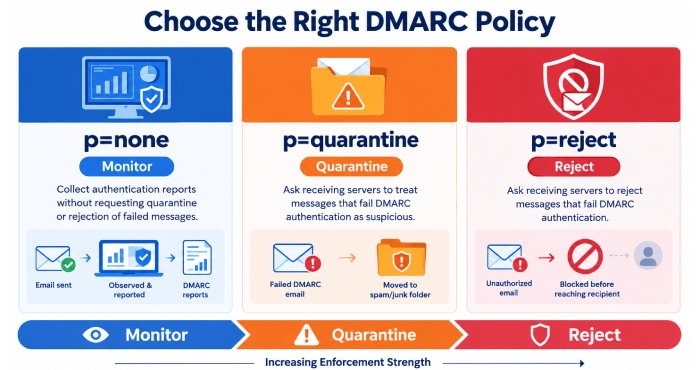
DMARC offers three policy options for handling messages that fail authentication.
p=none: Monitor Email Authentication
A p=none policy lets domain owners collect authentication reports without asking providers to quarantine or reject messages that fail DMARC. It’s useful during initial DMARC setup because it reveals email activity without immediately changing message delivery.
p=quarantine: Move Suspicious Emails to Spam
A p=quarantine policy tells receiving servers to treat messages that fail DMARC authentication as suspicious. Depending on the recipient’s mail system, those messages may go to spam or junk. Organizations should adopt this policy after identifying and correcting authentication problems.
p=reject: Block Unauthorized Messages
A p=reject policy tells receiving servers to reject messages that fail DMARC checks. It offers the strongest level of DMARC enforcement and helps prevent unauthorized senders from impersonating your domain. Before implementing it, carefully review your sending infrastructure and authentication reports.
Make DMARC Checks a Regular Part of Your Email Security Strategy
Email authentication isn’t a one-time setup. As your business adds marketing platforms, changes email providers, updates DNS records, or adopts new communication tools, your SPF, DKIM, and DMARC settings may be affected.
Regular DMARC checks can help you catch configuration errors, keep track of authorized sending sources, and maintain consistent authentication. They can also support a gradual move to stronger enforcement policies while helping avoid unnecessary disruption to legitimate business email.
Proactive monitoring can help protect your domain’s reputation, reduce the risk of email spoofing, and improve the chances that legitimate messages reach their intended recipients.
Before sending your next important email, take a moment to check your authentication records. A DMARC check can help surface issues early and support secure, reliable, trustworthy email communication.
