

In the intricate landscape of modern email communication, prioritizing strong domain security is essential. The process of conducting a DMARC check is vital for protecting your organization’s domain and its emails from risks like phishing, email spoofing, and misuse of your brand. This check involves scrutinizing the DMARC record published in the DNS zone of your domain to ensure it is present, accurate, and effective in enforcing email authentication protocols.
A well-structured DMARC policy provides several layers of defense. It utilizes DNS to guide mailbox providers and recipients on how to manage messages that are not authenticated but claim to originate from your domain. This forward-thinking strategy not only fortifies domain security but also protects your brand and enhances email deliverability by fostering trust with ISPs and recipients.
By publishing a validated DMARC record and conducting ongoing DMARC evaluations with reliable tools like EasyDMARC, dmarcian, or MXToolbox, you demonstrate compliance with recognized standards such as RFC 7489. These evaluations aid domain owners in avoiding configuration errors and ensuring robust management over policy enforcement, which helps guarantee that only authorized parties can send emails on behalf of your domain.
How DMARC Works with SPF and DKIM to Authenticate Emails
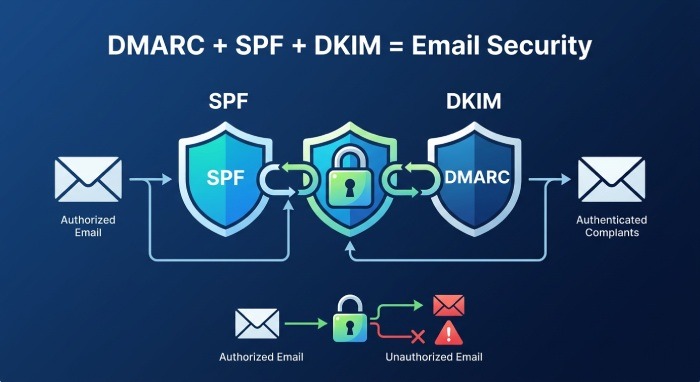
The Foundations of DMARC: SPF and DKIM
DMARC (Domain-based Message Authentication, Reporting and Conformance) is not an independent solution; it functions alongside SPF (Sender Policy Framework) and DKIM (DomainKeys Identified Mail). To properly authenticate domain ownership, both SPF and DKIM are essential components of the DMARC validation process.
- SPF check: This step verifies that the IP address of the email sender is permitted to send messages on behalf of your domain by comparing it to the SPF record set in DNS.
- DKIM check: This process maintains the integrity of the message by confirming that emails include a cryptographic signature linked to your domain’s DKIM key in DNS. Additionally, DKIM alignment ensures that the domain in the signature corresponds with the domain in the email’s “From” header.
DMARC’s Role in the Authentication Chain
A DMARC validation tool performs lookups to assess the DMARC record’s policy settings (such as `none`, `quarantine`, or `reject`), guiding email providers (like Google and Yahoo) on how to handle messages that do not comply with SPF and DKIM standards. This creates a more effective mechanism for distributing policies, thereby thwarting attempts by malicious entities to evade email authentication protocols.
Importantly, DMARC aids domain owners in establishing reporting and monitoring capabilities via the `rua` (for aggregate reports) and `ruf` (for forensic reports) tags, which provide essential insights into email authentication performance and instances of abuse within the email landscape.
How to Run a DMARC Check: Key Records, Tags, and Policy Settings to Review
Step 1: Locate and Review Your DMARC Record
To carry out a DMARC check, you can either do a manual DMARC lookup or use diagnostic tools such as DMARC Record Checker, DMARC Inspector, or MXToolbox. Input your domain (for instance, `_dmarc.example.com`) to access the DMARC TXT record published in the DNS. The record should start with `v=DMARC1`, indicating it adheres to the proper version tag.
Step 2: Examine Vital DMARC Record Tags
A DMARC record includes multiple tags, and a comprehensive validation examines these for correctness and conformity with policy aims:
- `p` tag (Policy): Establishes the fundamental DMARC policy for your domain, which can be set to `none`, `quarantine`, or `reject`. This influences the actions mailbox providers will take when authentication fails.
- `v` tag (Version): Must be specified as `DMARC1` to ensure proper syntax.
- `rua` and `ruf`: Indicate the URIs for receiving aggregate XML reports and forensic reports, respectively.
- `adkim` and `aspf`: Specify the alignment modes for DKIM and SPF (either relaxed or strict).
- `pct` tag: Indicates the proportion of messages that will be affected by the DMARC policy, useful for gradual implementation.
- `sp` tag (Subdomain Policy): Allows for a separate policy to be applied to subdomains, providing detailed control.
- `ri` tag (Reporting Interval): Determines how often (in seconds) aggregate reports are sent.
- `rf` tag and reporting format: Specify the format for forensic reports, generally `afrf` or `iodef`.
Step 3: Validate Syntax and Resolve Errors
A DMARC record validator, or dmarc tool online, detects syntax issues and potential misconfigurations, such as missing tags, invalid p tag values, incorrect version tags, or improperly formatted report URIs. Correcting these errors promptly helps mailbox providers accurately interpret and enforce your DMARC directives.
Understanding DMARC Check Results and Common Configuration Issues
Interpreting DMARC Validation Output
Once you’ve performed a DMARC lookup with your preferred diagnostic tool, take a moment to examine the results:
- Status: This reveals whether your domain has a valid DMARC record.
- Policy State: This specifies the present DMARC policy in effect (such as reject, quarantine, or none).
- Authentication Results: This section displays the alignment status of SPF and DKIM, along with the overall DMARC compliance for the messages tested.
Top DMARC checkers, like EasyDMARC or dmarcian, offer more in-depth information regarding reporting addresses, subdomain policies, and distribution methods. They also provide alerts for any missing aggregate or forensic reporting addresses.
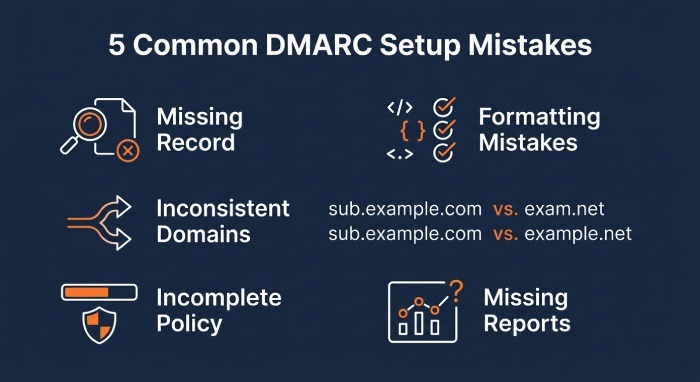
Common DMARC Misconfiguration Issues
- Absence of DMARC Record: Not having a DMARC record in your DNS puts your domain at risk of being spoofed.
- Formatting Mistakes: Errors in the structure (such as wrong DMARC tags or disallowed characters in the TXT record) lead to incorrect policy execution.
- Inconsistent SPF or DKIM Domains: A disparity between the header-from domain and the authenticated domain can cause policy failures.
- Incomplete Policy Implementation: Setting a `none` policy with full coverage (`pct=100`) provides zero protection against email spoofing or phishing incidents for your brand.
- Missing Reporting Addresses: The absence or misconfiguration of `rua` or `ruf` tags obstructs effective investigation and response to incidents.
By regularly checking these aspects of DMARC, domain owners can maintain compliance and ensure their policies are effectively enforced.
Best Practices for Improving DMARC Compliance and Preventing Email Spoofing
Strengthening Your DMARC Policy for Domain Security
- Initiate with ‘none’ and Monitor: Set your DMARC policy to `p=none` initially to gather aggregate and forensic reports. This will help you assess authentication outcomes, strengthen email security, and pinpoint any unauthorized or incorrectly configured email senders.
- Examine Aggregate and Forensic Reports: Look over the information sent to your `rua` and `ruf` reporting URIs. The aggregate XML reports will give you a clearer understanding of domain policy usage and highlight attempts by unauthorized entities, while the forensic reports will deliver specific details on failures.
- Implement ‘quarantine’ or ‘reject’ Policies Gradually: As compliance with your domain improves, progressively shift your policy from `quarantine` to `reject`. Utilize the `pct` tag and the reporting intervals to incrementally introduce stricter policies, thus reducing the risk to the delivery of legitimate emails.
- Achieve SPF and DKIM Compliance: Ensure your sending platforms — like your Email Service Provider (ESP), Managed Service Provider (MSP), or bespoke applications — are aligned with SPF and DKIM requirements.
- Conduct Regular DMARC Checks and DNS Audits: Frequently use DMARC validation tools to carry out lookups and check the DMARC settings, ensuring your DMARC record is correctly configured and adjusts to any changes in your authorized email sources.
Special Considerations for Enterprise and Brand Protection
- Oversee Subdomain Regulations: Implement the subdomain policy (sp tag) to dictate how DMARC is enforced on subdomains that fall outside the main policy’s scope.
- Leverage Enhanced Reporting: Configure addresses for forensic report deliveries, making sure to use the correct reporting formats (afrf or iodef). Focus on consistently evaluating aggregate and forensic report data.
- Keep Up with Standards: Stay updated on changes to DMARC guidelines and recommendations from authorities like RFC 7489 to safeguard your domain and emails from emerging threats.
By incorporating these recommended practices alongside regular DMARC audits, record searches, and continual evaluations with DMARC tools and diagnostic systems, organizations can enhance brand protection, secure their domains, deter email spoofing, and uphold trust in the global email network.
