
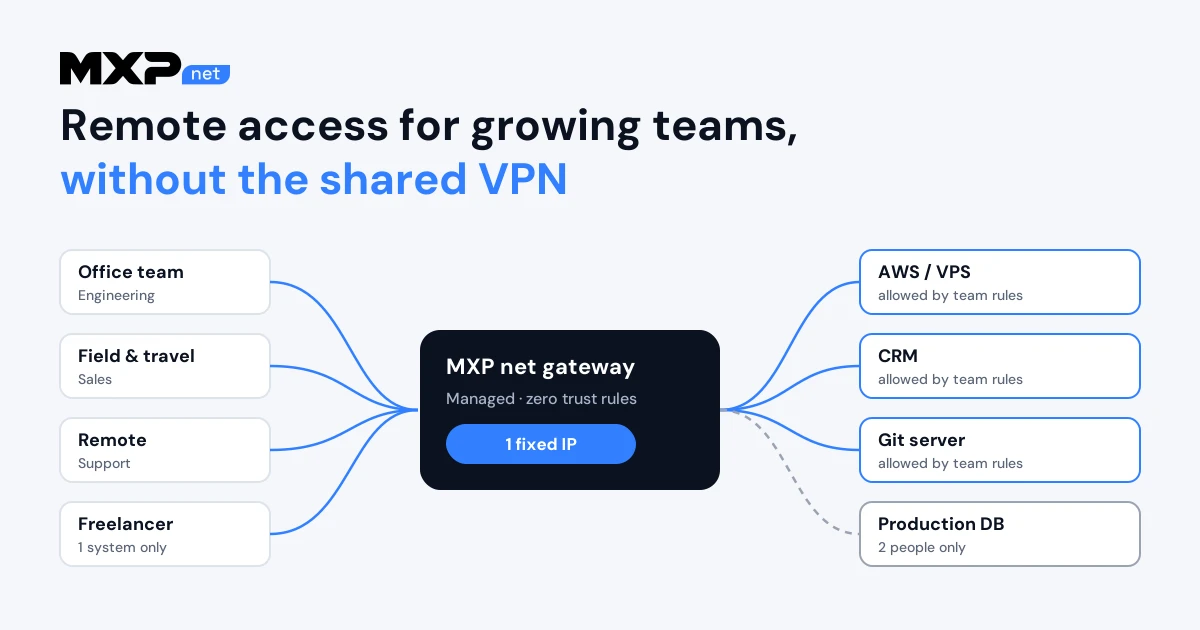
A typical startup at 20 people has developers in one city, a sales team in another, a few people fully remote, an agency handling marketing and a freelancer on the mobile app. Its systems live on AWS or a VPS, in a CRM, a Git server and an admin panel. Giving all of these people the right access, and only that access, is usually handled with a shared VPN config and a lot of trust.
This article explains how a managed zero trust platform simplifies that setup, using MXP net as the example: what changes for founders and IT, how it helps with audits and compliance, and how to roll it out in a day.
Where the usual setup breaks
Most startups start with one of three shortcuts, and each one stops working at a predictable point.
- A shared VPN. Everyone who connects reaches the whole network, including the production database. When a developer leaves, nobody is fully sure their config is revoked on every laptop and phone.
- Allowlisting home IPs. Security groups on AWS fill up with home broadband addresses that change whenever the router restarts. Someone opens 0.0.0.0/0 “just for today” and forgets.
- Shared credentials for agencies and freelancers. The marketing agency gets the same admin login as the team, and there is no record of who did what.
The common problem is that access is tied to a network or a password instead of a person. That makes offboarding risky, audits slow and every leaked credential a full breach.
What MXP net simplifies
MXP net is a corporate access platform built on Zero Trust Network Access (ZTNA). Instead of opening the network, it checks each person, device and request against rules you write once.
1. Setup without hardware or a network engineer
An admin creates a network in the console, picks a gateway region and a subnet, and the network is live in about 10 minutes. The gateway runs in MXP net’s infrastructure, so there is no appliance to buy and no change to office routers or cloud firewalls. Existing servers connect over an OpenVPN XOR tunnel or a Direct connection.
2. Access per person, not per network
Every rule names a source (an employee or a team), a destination (an IP address, a subnet or a domain) and an action (allow or deny). Developers reach Git and staging, sales reaches the CRM, and only two people reach the production database. Rules apply in list order, and a rule can be switched off for a while without being deleted.
3. One fixed IP for allowlisting
Each MXP net network gets its own dedicated public gateway IP. Put that single address in your AWS security groups, your database firewall and any banking or payment API that requires IP whitelisting, and remove the list of home broadband addresses. When someone works from a café in another city, their traffic still arrives from the same IP.
4. Agencies and freelancers without shared passwords
A freelancer gets their own account, mandatory two-factor authentication and one rule for the one system they need. When the contract ends, the admin disables the account and access stops on every device at once.
5. Teams on the move
Clients run on Windows, macOS, Linux, Android and iOS. Phones and laptops can also connect over IKEv2 through the built-in OS client, which holds the session when a device switches between office Wi-Fi and mobile data.
6. Security monitoring without hiring a SOC
Every request is re-checked against the user, the device and the policies, and sessions that look unusual for a team are stopped before they reach the resource. AI threat monitoring turns traffic anomalies into readable alerts, and security engineers are available 24/7 as part of the plan, with no separate SOC line on the invoice. For a startup that cannot yet hire a security team, that support is often the deciding factor.
Access logs, audits and compliance
As a startup grows, the questions about access stop coming only from inside the team. Enterprise customers send security questionnaires, investors ask about controls during due diligence, and data protection rules such as GDPR expect companies to protect personal data and show who can reach it. Many security frameworks and national cybersecurity rules also expect access logs to be kept for months, not days.
Access logs are at the center of all of these. When something goes wrong, the first questions are who logged in, from where, and what they reached. MXP net’s Activity Center records sign-ins with date, region and IP, active sessions per user, and which rule allowed or denied each request. That turns a stressful search through scattered VPN and server logs into a search in one console.
MXP net describes its infrastructure as HIPAA-ready and GDPR-compliant. To get the most from it, export access logs on a schedule to your own storage and keep them as long as your customers or local rules require. No access tool makes a company compliant on its own, but per-person access and a clean audit trail answer a large share of what a security questionnaire or an auditor will ask.
Rolling out MXP net in one day
- Morning: list your systems. Write down Git, CI, the CRM, databases, admin panels and anything on AWS or a VPS, with the address and who uses each one.
- Create the network. Pick the gateway region closest to your team and a subnet that does not clash with your office LAN. The network, its gateway IP and its rule set come up in about 10 minutes.
- Connect your servers. Link cloud and on-premises systems over an OpenVPN XOR tunnel or a Direct connection, and add internal domains in Private DNS so people reach crm.internal instead of an IP.
- Lunch: allowlist one IP. Replace the home IPs in your AWS security groups and payment or banking API settings with the network’s gateway IP.
- Build teams and rules. Create Engineering, Sales, Support and Contractors, then write rules from most sensitive to least. Production database access goes to the smallest group.
- Invite people and turn on 2FA. Invite everyone by email, make two-factor authentication mandatory for the organization and share the client download link.
- Evening: test and switch off the old access. Check from a phone on mobile data that each team reaches only its systems, confirm in the Activity Center that denied requests are logged, then remove the shared VPN and the leftover IP rules.
What to check before you commit
A short list of questions to bring to the 30-minute demo, so the trial answers them with your own systems:
- Gateway region. Gateways run in the UAE, Germany, the USA, the UK and Thailand. Pick the one closest to most of your team and measure response times to your real systems during the trial.
- Log export and retention. Confirm how to export access logs and how long you can keep them.
- Identity provider. If your team signs in through Google Workspace, Okta or Microsoft Entra ID, ask how accounts are managed alongside it.
- Pricing for your size. MXP net prices by quote, and you pay only for the servers you order. Ask for a written quote for your user count and regions.
Frequently asked questions
What is MXP net?
MXP net is a corporate access platform built on Zero Trust Network Access. It gives each company network a managed gateway, a dedicated IP and per-employee access rules, so staff and contractors reach only the systems they need.
Is MXP net a VPN?
It uses VPN protocols such as OpenVPN and IKEv2 for connections, but access works on zero trust principles. A regular VPN opens the whole network after login; MXP net checks every request against rules for that person and device.
Does a startup need hardware to use MXP net?
No. The gateways run in MXP net’s infrastructure, and employees connect through an app on Windows, macOS, Linux, Android or iOS.
How long does it take to set up?
A network with its gateway and rule set comes up in about 10 minutes. Most small teams can connect their systems, invite staff and retire a shared VPN within a day.
Does MXP net help with security audits and compliance?
Yes. It records sign-ins with date and IP, active sessions and every allow or deny decision in one console, which answers the access questions in most security questionnaires and audits. MXP net describes its infrastructure as HIPAA-ready and GDPR-compliant.
Try it with your own systems
The quickest way to judge MXP net is to see it run against your own stack. Book a 30-minute technical demo on mxp.net, connect one real system such as your CRM or a staging server, and test the rules with your team during the free trial.
